



References:
- MarkItDown: Microsoft’s Document-to-Markdown Converter Deep Dive
- PDF Table Extraction: Docling vs Marker vs LlamaParse Compared
- Docling vs LlamaParse vs Unstructured vs Reducto: Document Parser Comparison
- microsoft/markitdown GitHub Repository
— Lyra Celest @ Turbulence τ.

Just finished brewing my coffee and happened to scroll through some newly released research reports. Glanced at the calendar—we’re almost halfway through April 2026. How is everyone still stressing over something as trivial as “how to feed files to an LLM”?
Waking Up from the Formatting Illusion
Let me share a counter-intuitive stat. As far as I know, of all the fancy documents you throw at AI right now, at least 30%—meaning 3 out of every 10 reports you send—are completely “unreadable” to machines.
The flashier the formatting, the higher the probability of AI hallucinations.
Which brings me to what I want to talk about today: MarkItDown. This is a lightweight, open-source Python tool from Microsoft that just happened to update to v0.1.5 a few days ago. The philosophy behind this tool is brutally straightforward. Whether it’s a PowerPoint presentation, a legacy Excel file riddled with macros, or even a video with embedded audio, it strips everything down into the most primitive Markdown text.
To use an analogy, it’s like dumping an exquisite full-course French dinner into a blender and pureeing it into a nutrient sludge. Aesthetically zero, right?
But to be honest, that’s exactly the kind of shape an AI’s appetite prefers.
One detail I absolutely love is its new OCR plugin. When it encounters embedded images it can’t read, it doesn’t try to brute-force it. The code simply calls an external LLM Vision (like GPT-4o or a locally deployed model) to do “image-to-text”. It really saves a lot of hassle. No complex compute overhead.
Microsoft’s “Calculated Neglect” and Open Conspiracy
After poking around its code repository, I noticed a rather amusing detail.
This thing processes its own PPTX and DOCX files with absolute silky smoothness. But ironically, when it encounters the world’s most troublesome format—PDF files—it simply extracts pure text. Unless you go out of your way to hook up Azure Document Intelligence.
You might think Microsoft is playing dirty to upsell its own cloud services.
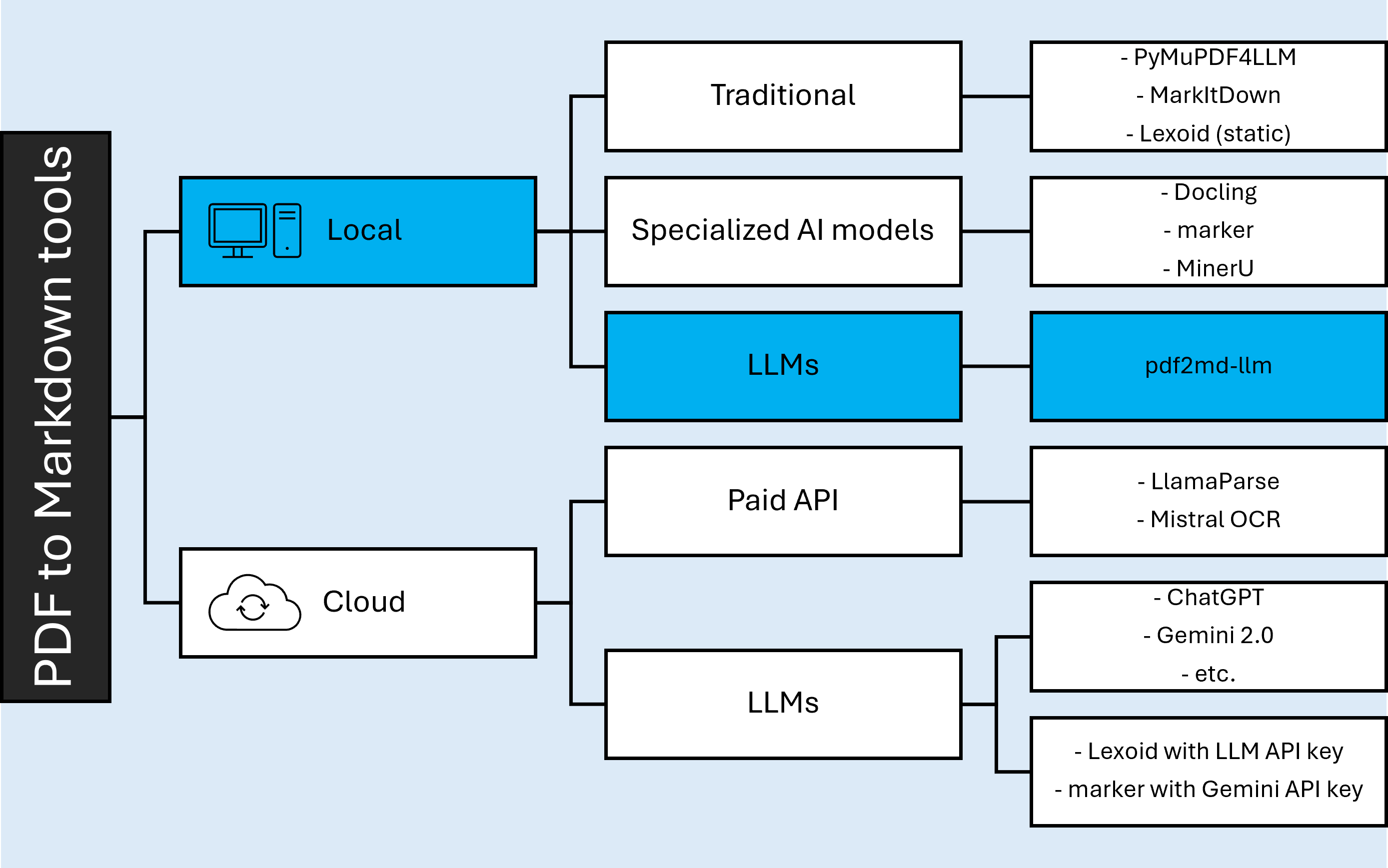
But my shallow take is that this is actually brilliant. They absolutely refuse to touch the disgusting coordinate system reconstruction of PDFs, offloading that dirty work to the cloud. This keeps the local package extremely lightweight.
Moreover, in this major release, they quietly added an MCP (Model Context Protocol) server.
This is fascinating. It means it can seamlessly plug directly into rival applications like Claude Desktop. It doesn’t care whose AI brain you use; it just wants to be the one quietly handing you the spoon.
The Specialist in a Race to the Bottom
Come on, let’s compare it with its peers.
Currently, in the PDF parsing space, LlamaParse is definitely the premium player. The accuracy is incredibly high, especially when dealing with complex tables. The problem is the price—once your free tier runs out, you have to pay with real cold hard cash.
What about IBM’s Docling? It runs blazing fast locally, and its dataframe extraction is top-notch.

But the moment Docling encounters bizarre layouts, it tends to mash line numbers together. In comparison, to put it bluntly, MarkItDown is practically half-crippled when it comes to handling serious PDFs.
But there’s one thing you need to understand.
In real-world business scenarios, what you’re often facing is a chaotic mess of ZIP archives. Inside, you’ll find a mix of a few Excel spreadsheets, several invoice screenshots, and maybe even a YouTube video link. This is where MarkItDown can swoop in and flatten the whole lot for you in one go. With just a few megabytes of code, you run a simple pip install 'markitdown[all]' and it’s up and running. You don’t need a GPU with massive VRAM.
And that is enough.
What If “Typesetting” Ceases to Exist in the Future?
I sometimes wonder if we have some sort of human-centric obsession with “document formatting”.
All of our current document tools—bolding, alignment, headers—are entirely designed to make things visually pleasing for human eyes. What if, in the companies of the future, the primary readers of these reports are purely AI Agents?
When writing weekly reports in the future, we might as well just toss up a JSON tree or pure Markdown nodes. We won’t even need to worry about first-line indents.
Or maybe I’m overthinking it. After all, bosses still love seeing those shiny, flying animations on PowerPoint slides. But this precisely exposes a pain point in the entire information extraction track right now.
We are still using last century’s molds to hold next century’s water.
By the way, there’s an account named microsoft-office on their code contributor list. I genuinely don’t know if it’s a bot account or an alias for some department rolling up its sleeves to do the grunt work.
Looks like the rain outside has stopped. My terminal just threw two more environment dependency errors, so I need to go fix them. What tools do you guys usually use to tear apart PDFs? Let me know in the comments.
